From the sketches that I have made, I have created a turnaround sheet for the Surveillance bot.
I have done it in the same style as Alex's turnaround, which will good to show at presentations. With this, I can begin work on modelling the Surveillance bot.
Showing posts with label Designs. Show all posts
Thursday, 6 December 2012
Thursday, 10 May 2012
Skyward Islands
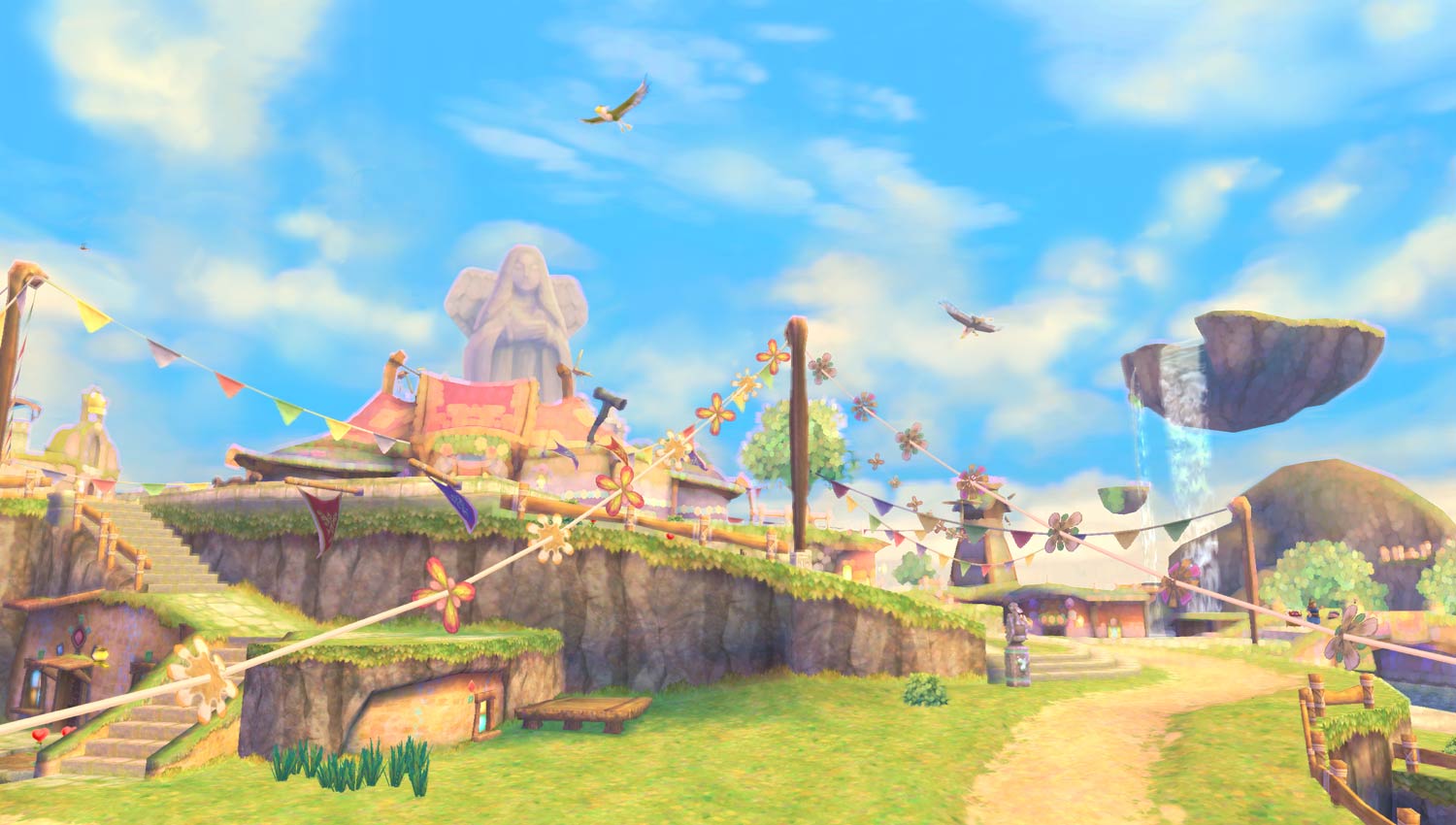
A heavy influence to my concepts is The Legend of Zelda: Skyward Sword, specifically the floating islands of Skyloft. I really like the bright and colourful feel of the entire game, it is something that I would like to emulate for my own floating Island.
All of the textures in Skyward Sword are cartoon-y and painterly, I will have to make sure I choose similar textures for my own enviroment.
Avatar's Floating Islands
One of my first influences when looking into floating islands was the movie Avatar, which features massive floating mountains. These look fantastic, though I don't think I'd be able to recreate these. I am personally looking for a more cartoon-y style and look.
Final Concept and Floor Plan
I have produced a final concept for my floating island enviroment. After the tree tutorial I decided to make the trees have multicolored leaves as it makes the environment feel more magical and fit the feel I am going for.
I also produced a simple floor plan based on this concept to help the modelling process.
House designs
In my Sceneography I wrote about how a Wizard lived on the Island. However, I did not think that it would be obvious to the player that a Wizard lived there. I thought of an idea to combine a traditional wizards hat with the house.
I think this will help communicate with the player and set the mood of the enviroment a lot easier.
Floating Island Concepts and Sceneography
I developed my sketches a bit more and made a new concept for my Floating Island Environment. I used my Sceneography to also help develop my concepts.
---
SCENEOGRAPHY –
REFINED BRIEF
Name : Ryan
Lancaster
Project Brief: UFO/ FAIRYTALE / KIRKSTALL ABBEY
- ( delete as applicable )
Project Title: Floating
Island
Broad Audience: Child / Teen / Family / Mature - (delete as applicable )
Mood / Atmosphere:
Light, relaxing.
Scene Description
Time of Day: Midday/morning INTERIOR
/ EXTERIOR / BOTH
Explanation /
Backstory of Scene:
A man, travelling through the skys by airship, falls after
encountering a turbulent storm. He awakes to find himself on a floating island,
covered in grass and peppered with gigantic glowing crystals. The only signs of
civilisation being a single house, owned by an eccentric wizard and a dock
going out to the open sky. Smaller islands can be seen in the distance, with
similar crystals on them.
The entire island is calm and relaxing. A small pocket of
nature in the sky.
---
I have taken some inspiration from games such as Skyward Sword and Crash Bandicoot, I would like to recreate the simple and lighthearted feel those games had.
Tuesday, 6 March 2012
Floating Island sketches
I made some sketches for my Floating Island enviroment.
At the moment I'm still getting a feel for how I want the Island to look. I have decided I want to have a family friendly enviroment, one which is bright and colorful.
Tuesday, 28 February 2012
UFO B-movie scene
Here is some sketches for the B-movie UFO crash scene.
The scene would be set in a warehouse, with a section changed with a fake UFO and backdrops. There would also be film equipment and various other things. The area would be blocked off by warehouse walls.
I really like the twist in the UFO crash here, as I am using cliche UFO visuals, it should also be pretty easy to model.
Floating Island Moodboards
I have decided to develop my fairytale idea. As the location can only be a limited size, I decided that a floating Island in the sky could be a good idea.
I decided to make some mood boards for how I'd like the island to look and what style i'd like it to be.
Already I have begun to develop some ideas, using crystals, wings and vivid colours. I would like to do more development for the building on the island, I'll need to know who lives there and how this will reflect in the building.
Ideas mind map.
I have made a mind map showcasing some ideas that I have for the location. I am not sure I I want to the the Kirkstall Abbey location as I think I could do better with a more imaginative and unique location.Ideas that I quite like are the B-movie style UFO crash and the floating island.
Friday, 10 February 2012
Animating the toy
Finally it was time to animate my toy. I decided to animate my toy in separate scenes, which would allow me to change cameras quite easily and ensure that a single file wouldn't get too big.
First I animated a walk cycle, I tried doing it in how I explained it in the storyboard, however this proved to be problematic.
This walk cycle was too cumbersome and slow for the scene I wanted to portray. I decided to make a new walk cycle that was more of a shuffle and could be faster.
This walk was much cleaner and faster, which would suit the small toy well. I decided I would keep the style of walk for the big toy as it was needed for the last scene to work.
Most of my animations would be the walk cycle plus starting and stopping, so I could re use this animation a lot. I used the infinity tool in the first scene of my animation to make an infinite walk cycle.
For the bigger toy I used some squash and stretch for his footsteps, to make him seem more heavier. I used the same thing for when the small toy jumps into the big toys foot.
I decided that when the big toy falls over that the scenery should jump up, to show just how heavy the big toy was. I made a small test animation to see how this would look.
The hills would need to be a lot smoother but I thought that it would be good to put into the final animation.
During the final parts of the animation I did start to rush a bit, as I needed time for the animation to render out and I was under pressure from other work, I felt like I could of done the ending better if I had more time.
With all the Maya work done for my animation I made some quick title cards using flash.
Storyboards and Animatic
It was time that I produced a storyboard for my animation, I needed to make sure I kept it simple enough so I could animate it easily.
I produced a rough storyboard in my sketchbook, A small toy will walk into the scene, then a large toy will walk into the scene, the big toy will walk forward but the small toy will run underneath his foot and knock him, causing him to fall over. A simple animation that I could produce with my skill level.
I then produced a cleaner version on photoshop, I made the background a rolling vista of link hills to fit with my character design.
Finally I produced an animatic to help me figure out the timings for my animation.
Tuesday, 31 January 2012
Individual film ideas & storyboard
For our first task we had to create a one minute instructional video. This could be done in any style and be about anything we wanted. Immediately I started to sketch some ideas.
I decided I wanted to do an instructional video for something very simple (How to fry and egg) and make it very melodramatic. I also wanted to make it funny so I would juxtapose the very serious scenes with more comedic scenes.
After I fleshed out some ideas for my film I created a storyboard for the key frames of the video.
I planned to make the serious scenes black and white, taking place in a field. It would then cut to the actual instructional part of the video in full colour and in the kitchen. All of the scenes in the video would only require a crew of one, with the use of a tripod.
Subscribe to:
Comments (Atom)